
People use “internet” and “Wi-Fi” like they mean the same thing. But the problem is they don’t, and being able to tell the difference can save you a lot of frustration when something stops working, helping you figure out whether the fix is on your end or ours.
What’s the Difference?
Your internet is the connection between your home and your internet provider. It’s what brings the outside world to your house.
Your Wi-Fi is the wireless connection between your router and your devices. It carries that internet signal around your home to your phone, laptop, TV, and other devices.
Think of it like water. The internet is the main line running to your house. Wi-Fi is the plumbing inside. Problems can arise with both, but the fixes to those problems are very different.
The Journey From the Internet to Your Device
Here’s the path your connection takes with Wisper:
Wisper network → Outdoor equipment → Router → Wi-Fi → Your device
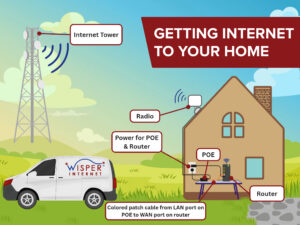
A problem at any point along this path can slow you down. The trick is figuring out where.
Is the Problem With Your Wi-Fi or Your Internet?
When your connection isn’t working right, work through these steps in order. Each one helps narrow down the issue.
1. Check More Than One Device
If only one device is struggling, the issue may be that device, not your internet or Wi-Fi. Simply restarting your phone or laptop may fix the problem straight away.
2. Check Your Location
Try the same device in different rooms. If performance changes a lot depending on where you are, Wi-Fi coverage is the likely culprit. Check our guide to proper router placement for the best Wi-Fi connection.
3. Get Closer to the Router
Run the same test right next to your router. If speeds jump when you’re close, that points to a Wi-Fi issue.
4. Try a Wired Connection
If you can, plug a device straight into your router with an Ethernet cable. If the wired connection runs well and Wi-Fi doesn’t, you’ve found your problem: it’s the wireless network.
5. Check Multiple Devices at Once
If several devices have the same trouble, especially near the router or on Ethernet, the problem is probably further upstream with your internet connection.
What Can Affect Your Wi-Fi?
Wi-Fi is sensitive to its surroundings. Common troublemakers include:
- Distance from the router, since the signal weakens the farther you go
- Walls, floors, and other obstructions, especially brick, concrete, and metal
- Router placement, like tucking it in a cabinet, closet, or corner of the basement
- Too many connected devices competing for the same signal
- Older phones, laptops, and tablets that can’t keep up with newer Wi-Fi standards
- Wireless interference from microwaves, baby monitors, and neighboring networks
- Outdated routers that weren’t built for how many devices a home uses today
The good news: most of these you can fix yourself. Moving your router to a central, open spot often makes a bigger difference than people expect.
What Can Affect Your Internet Connection?
These issues happen before the signal ever reaches your router:
- Service outages
- Problems with your outdoor equipment or router
- Network congestion during busy hours
- Damage to network infrastructure from storms or accidents
- Scheduled maintenance
- Issues with the physical connection to your home
- Problems on the provider’s side of the network
These usually aren’t things you can fix from your couch, which is where Wisper comes in.
When Should You Contact Your Provider?
Before you call, try restarting your router and equipment. It fixes more problems than you’d think. If that doesn’t do the trick, reach out when:
- Multiple devices are consistently affected
- Wired and wireless devices both perform poorly
- Your connection keeps dropping
- The problem follows you no matter where you are in the house
If you’ve worked through the steps above, you’ll already have useful details to share, and that helps us track down the issue faster.
Still not sure whether it’s your Wi-Fi or your internet? Call Wisper support at 800-765-7772 or email us at support@wisperisp.com. We’ll help you sort it out and get your connection back to where it should be.